Evala: Connecting Employees, Accountants, and State Authorities
To respect Non-Disclosure Agreements (NDA) and the “greenfield” nature of this project, all screenshots are presented from a distance to ensure the specific text and sensitive data remain unreadable. These visuals are intended to demonstrate the overall layout, system architecture, and information density rather than proprietary business content.
The context
Payroll administration is one of the most complex domains in enterprise software, governed by rigid legislation and fragmented government interfaces. I was tasked with designing, alongside my UX colleague, a “greenfield” solution to bridge the gap between three distinct layers: the Employee Portal, the Payroll Accounting Software, and State Institutions (ČSSZ, Health Insurers, and the Labor Office).
The challenge
Transform a manual, paper heavy process into a streamlined digital workflow. The system needed to handle a vast array of documents each with unique life cycles and deadlines. Before my involvement, these entities and the centralized “Submission Queue” did not exist in the system.
My role
UX/UI Designer
As a UX/UI Designer I am working on Evala, a cloud based accounting software by Seyfor. Specifically, I was responsible for the end to end design of the Payroll module’s core entities. My role went beyond visual design; I acted as a bridge between complex legislative requirements and user centric interfaces.
Key responsibilities
- Technical Analysis. Because the initial project specifications were high-level, I took a proactive approach to research. Working closely with another UX designer and the Product Manager, I conducted independent research, analysing legislation, consulting with professional accountants, and even contacting the Social Insurance Agency to verify edge cases.
- System Mapping. Helped to categorize payroll events into standalone Entities (e.g., ELDP) versus Actions (e.g., Onboarding/Offboarding) to ensure a scalable product structure.
- Icon Design. Created new icons to represent specific payroll entities and actions, maintaining consistency with our internal design library.
- Logic & State Modeling. Defined the state models for “eNeschopenka” (Electronic Sick Leave) and “ELDP” (Pension Records), including the logic for automated notifications and document submissions (NEMPRI, HZUPN).
The Complexity Challenge
The fragmentation of truth
Before this project, accountants operated within fragmented legacy environments. Information was scattered across unstructured systems, email chains, and physical paper trails. There was no single source of truth, creating an immense cognitive load.
The Goal
To replace manual, error prone workflows with a structured, automated engine that bridges the gap between the Employee Portal, the Accountant, and the State Authorities.
Deciphering the Legislative “Black Box”
One of the primary hurdles was the lack of clear functional specifications. Since the project started with high-level requirements, I deconstruct dense legislative requirements into logical system rules.
- Proactive Research. I analysed the entire ecosystem of forms (social events, employee data, etc.).
- Direct Investigation. When documentation was insufficient, I conducted my own research—consulting with professional accountants, using AI for legislative deconstruction, and contacting the Social Insurance Agency directly to verify technical nuances.
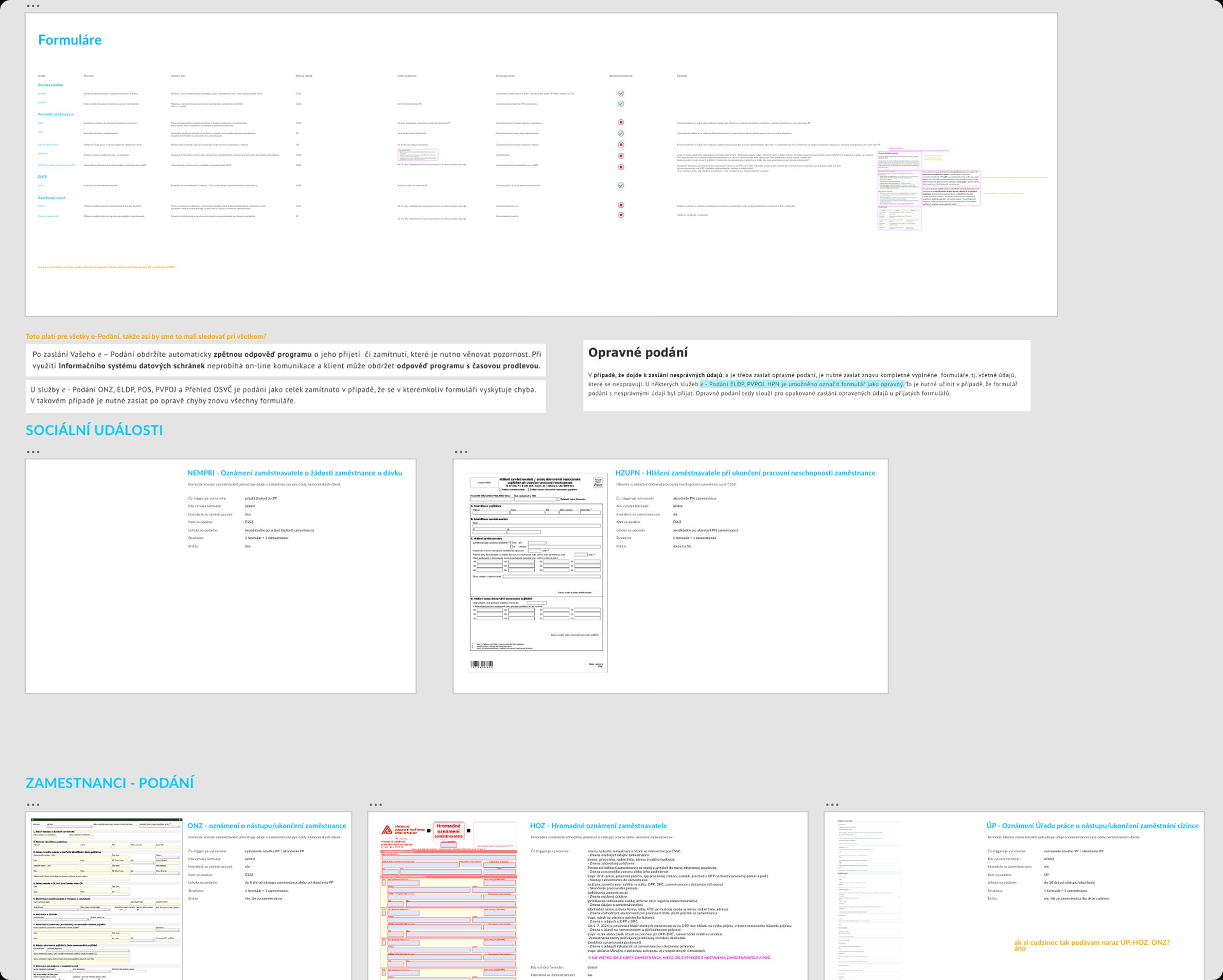
Analyzing forms
Designing for High-Stakes Monitoring
Payroll is a series of critical deadlines. Unlike standard administrative tools, this module acts as a monitoring engine for time-sensitive social events.
- The “Month-End” Hurdle. Handling “corner cases” was the most demanding part of the design process. For instance, long term care leave (Dlouhodobé ošetrovné) often spans over three months. I designed the Duration field to dynamically trigger additional input fields. This ensures accurate data collection for specific reporting periods without directly intervening in the final paycheck calculations.
- Dynamic State Modeling. I implemented rule based UI logic where the form adapts in real time. For example, specific dates entered by the user automatically unlock or hide sections of the form to comply with different reporting requirements for month end closures.
System architecture & data logic
To bring order to the complex payroll domain, I had to look beyond screen design and define the underlying logic of how data flows through the system. My contribution focused on three major pillars, which I owned as a UX Designer, ensuring they were both technically sound and user friendly.
The ELDP entity
I was responsible for the complete design and state architecture of the ELDP (Pension Records) entity. Unlike simple forms, ELDPs are long lived objects that require precise tracking.
Dual Layered State Synchronization. I designed a synchronized state model to ensure the accountant always has a “single source of truth.”
Entity Level. The ELDP tracks its overall progress.
Submission Queue Level. Once moved to the queue, the system tracks technical sub states.
I architected the automation where a successful submission in the queue automatically triggers a status update on the parent entity, providing immediate visual confirmation and reducing manual cross checking.
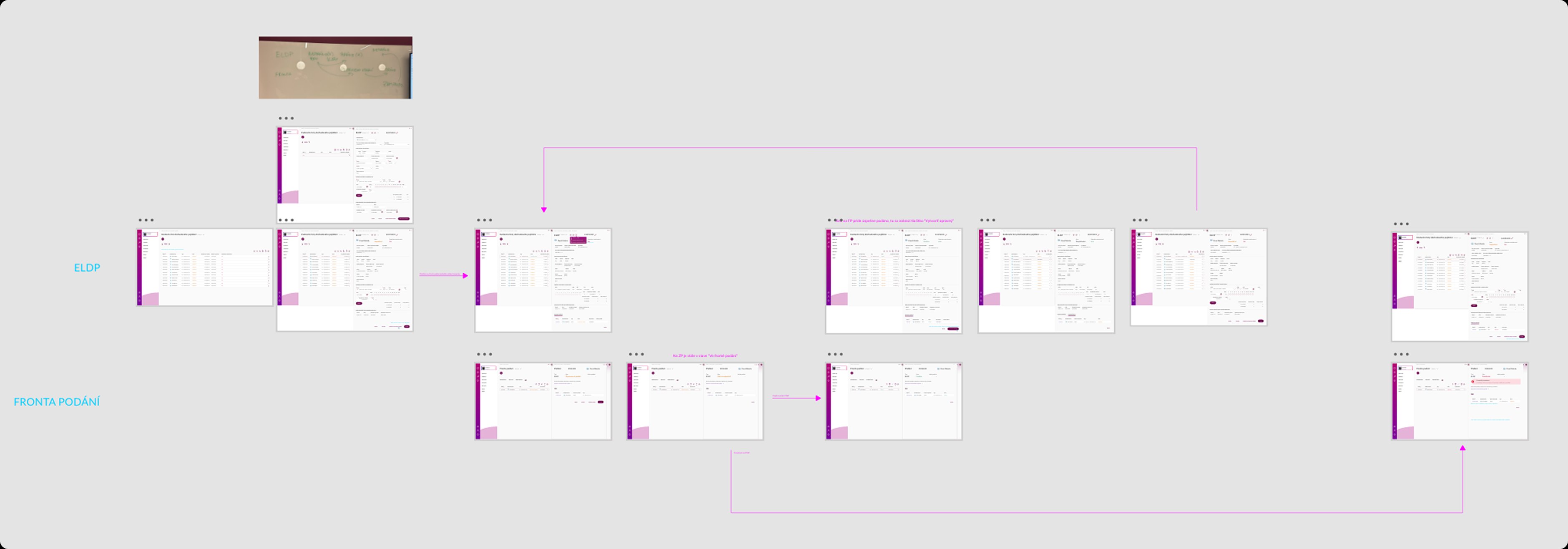
ELDP userflow
The eNeschopenka workflow
The eNeschopenka is a high priority electronic sick leave record that enters the system via API, Data Box, or XML. I designed a proactive monitoring logic that triggers critical alerts for the accountant.
- Threshold Notifications. If a sickness exceeds 14 days, the system automatically notifies the accountant that a NEMPRI form must be submitted.
- Closure Alerts. If the sickness was longer than 14 days and has ended, a notification for the HZUPN form is triggered.
- Direct Action. To streamline the process, both forms can be generated and sent to the Submission Queue directly from the eNeschopenka view, ensuring strict compliance with state regulations.
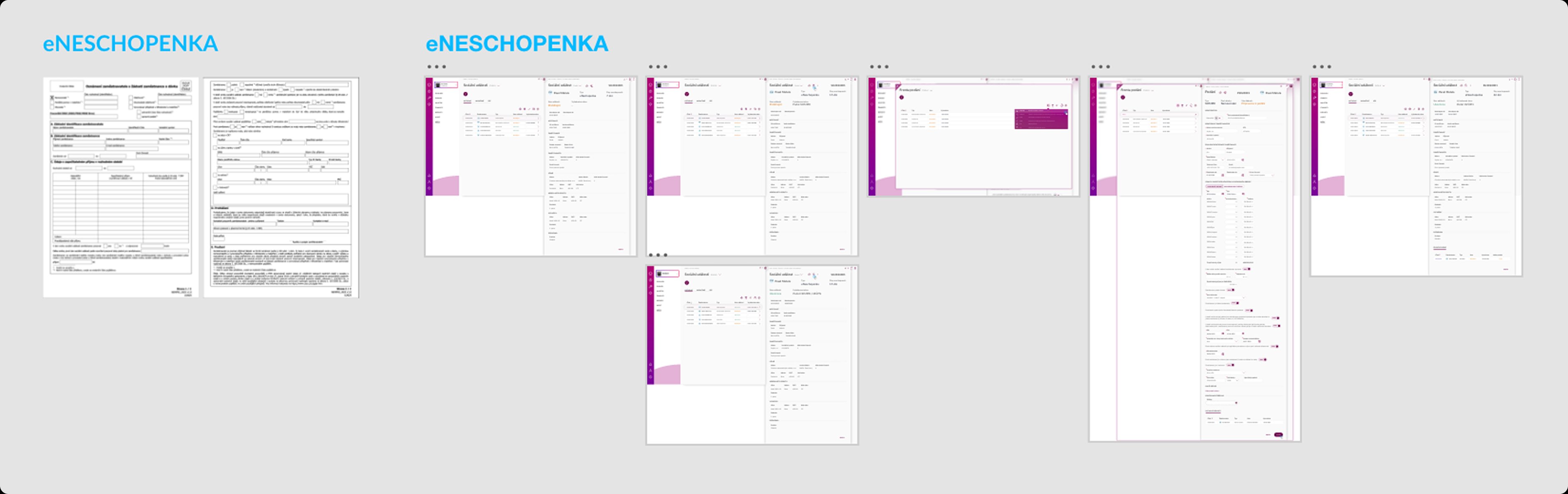
eNeschopenka userflow
Employee-centric workflow
Beyond standalone entities, I designed the interaction model for actions performed on an Employee. This focused on creating a seamless bridge between employee management and government reporting.
- The Workflow. I designed a solution where an accountant can open the “Fronta podání” (Submission Queue) directly from a specific employee’s profile.
- Just-in-Time Creation. Within this contextual view, the user can instantly generate required forms (e.g., MPSV Onboarding/Offboarding or ONZ notifications). This removes the need to navigate away to a separate module, keeping the accountant’s focus on the task at hand.
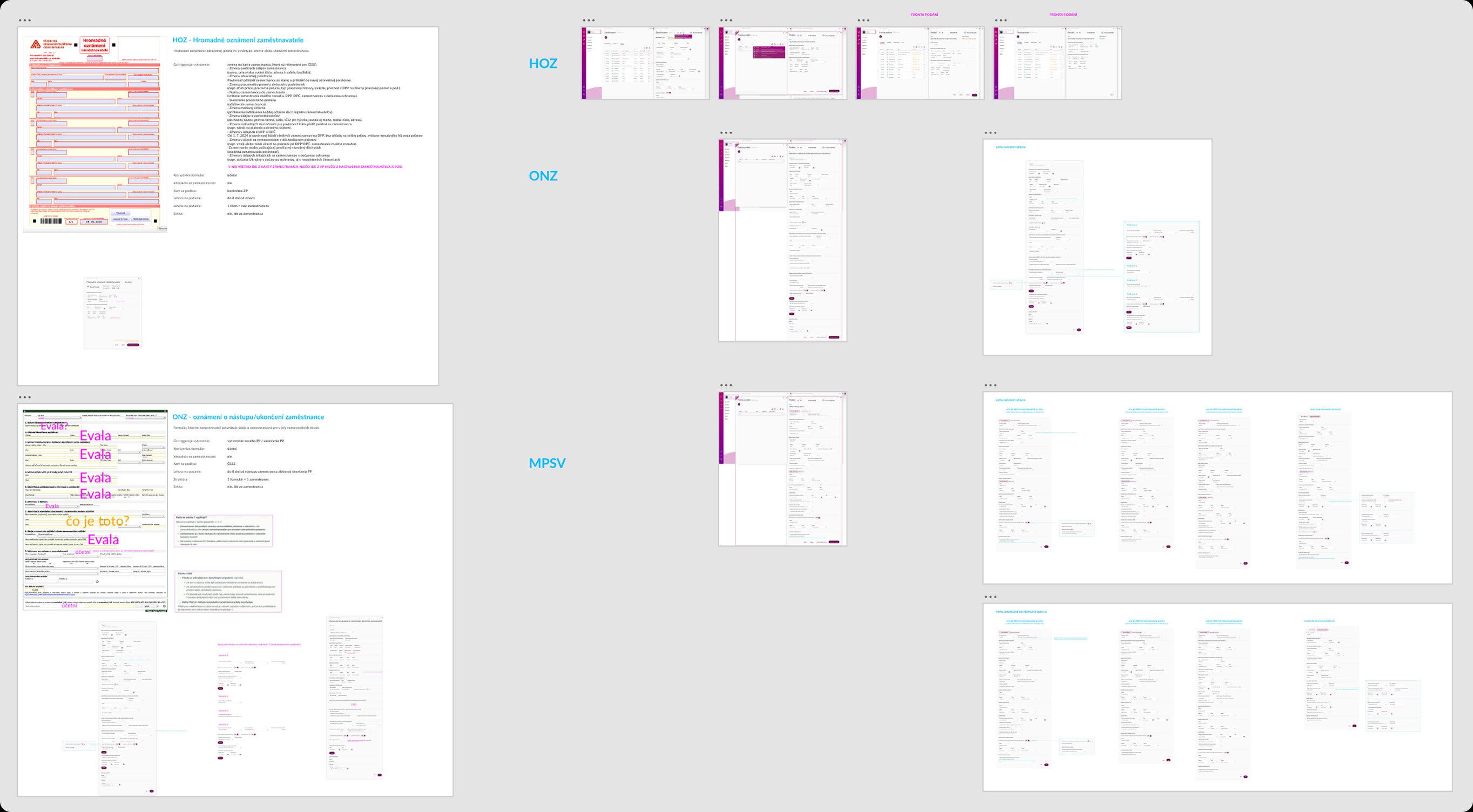
Creating forms on “Employee”
Results & takeaways
The solution
The final design successfully transformed a chaotic legislative process into a streamlined, cloud based monitoring system. The focus was on clarity, error prevention, and ensuring that the accountant remains in control of every submission.
- High-Density Dashboard. A centralised view for monitoring hundreds of submissions with colour coded status indicators for instant visual scanning.
- Contextual Submission. The ability to handle state reporting directly from employee profiles or social event records, keeping the workflow focused and efficient.
The results
Unified Data Architecture
By organizing payroll events into clear categories — long term records (Entities) and daily tasks (Actions) — we built a system that mirrors an accountant’s actual work. This provides a predictable structure where users always know exactly where a record “lives” and can track its entire lifecycle without confusion.
Connecting the Triangle
We successfully closed the loop between the Employee, the Accountant, and State Authorities. By streamlining how requests from the Employee Portal flow into the accountant’s backend and finally to the government portals, we eliminated the need for external communication channels and physical paperwork.
Proactive Compliance
The system moved from being a passive database to a proactive assistant. By monitoring external API signals and internal thresholds, Evala now guides the accountant on what needs to be submitted and when, significantly reducing the risk of missing legal deadlines.
Key takeaways
Translating Complexity
I learned how to translate rigid, dry legislation into a flexible and intuitive user experience.
Utility Over Compliance
I learned that payroll software cannot just be “legally correct”, it must be practically usable. While legislation provided the rules, the accountant’s daily workflow dictated the design.
Enterprise Precision
In enterprise software, UX is about more than aesthetics — it’s about architecting a reliable engine that users can trust with high stakes tasks.